Monday, April 6, 2009

Alpha, Beta, Meta...

Having learned about DBMS architectures, its not time to talk about the actual content of these databases.

Specifically, there is data, and then there is Metadata.

Metadata: the Alphadog

Metadata is data about other data, so it gets a fancy name.

Metadata can fall into 3 categories:
  • Descriptive: Information describing the intellectual content of the object
  • Structural: Information that ties each object to thers to make up logical units
  • Administrative: Information used to manage the object or control access to it

Why bother with it?

At times, it is not convenient to deal with the actual data contained in the database. By using metadata, a database administrator (DBA) can "organize, locate, manipulate and otherwise work with data when it is not necessary or desired to actually deal with the data itself." (www.linfo.org)

For further reading, please go here.

References:


"Metadata." en.wikipedia.org. 3 Apr 2009. 6 Apr 2009

"Metadata definition." linfo.org. 21 Mar 2006. 6 apr 2009

Where I Learn a Taste of Power...

So now that I have learned about the purpose of a database, the types of database models, and even a little about the various database management systems that would allow me to benefit from some of the advantages of a database, its time for me to learn a bit more about the means of searching for and retrieving information from the vaults that are databases.

Time for a new definition:

Query: Method used to request information from a database (Jessup, Valacich, and Wade 419)

If I know how to transmit a query to my DBMS, I have almost endless amounts of information at my fingertips!

So how would I transmit my queries? There are two common ways:

  • Query by Example (QBE): A capability of a DBMS that enables data to be requested by providing a sample or a description of the types of data we would like to see.
  • (Jessup, Valacich, and Wade 419)

  • Structured Query Language (SQL): The most common language used to interface with databases (Jessup, Valacich, and Wade 421)

Learning SQL gives me power, because it is a language I can then use to customize and tailor my queries to suit exactly my needs.

SQL: An Incredibly Awesome Tool

SQL is a fourth generation language (4GL): A computer language commonly used to write and execute queries of a database (Jessup, Valacich and Wade 79)

4GLs are also known as outcome-oriented languages, because they are designed with a focus on the desired outcome (retrieving specific information from databases) rather than the required steps to achieve the desired outcome. These languages are more intuitively similar to English, making the learning of them fairly easy.

So here I go, trying to learn basic SQL.


Basic SQL:


SQL can be broken down into 2 purposes:

  • Data Manipulation Language (DML): These are query and command commands
  • Data Definition Language (DDL): These commands seek to create, or delete the tables that the database uses to store the data, edit the tables' primary and foreign keys and define constraints between tables.

Here are the following basic comands:

For tutorials on SQL syntax, go here and here.


References:

Jessup, Leonard M., Joseph S. Valacich, and Michael R. Wade. Information Systems Today: Why IS Matters. 2nd ed. Toronto: Pearson Prentice Hall, 2008.

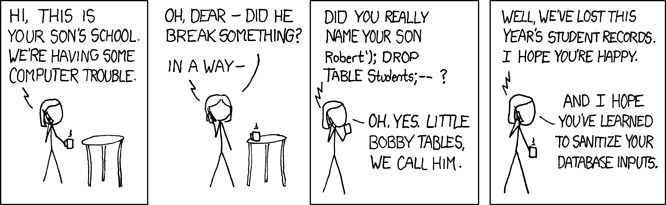
xkcd.com/327/ . 6 Apr 2009


"SQL." en.wikipedia.org. 03 Apr 2009. 6 Apr 2009


Sunday, April 5, 2009

Architecture: Sometimes It Never Gets Off the Ground

I am having so much fun with the titles of my posts! Blogging is addictive!

So, now that I am convinced that DBMSs are truly exemplary of the greatness of mankind, I am setting out to understand the different categories of DBMSs or in fancy nerd-language, the different types of DBMS architectures.

Architects Build Models

I am feeling slightly hippy, so here is a definition to suit my mood:

Data flows: Data moving through an organization or within an information system. (Jessup, Valacich, and Wade 413)

That was fun!
And now, onto more serious fodder:

Data model: A map or diagram that represents the entities of a database and their relationships. (Jessup, Valacich, and Wade 413)

And, how convenient! Here is an illustration of 5 common data models:

(Many thanks to Wikipedia for the image.)

4 common Database Models are the following:

For further reading on the 4 common database models listed above, and on some more unusual ones, go here.

DBMS programs

Now, onto the more interesting stuff. Having designed a database system to suit an organization's strategic goals, the next crucial decision is the one to choose which DBMS program is the one best suited for the organization. There are several of these programs, so here are the tree most common ones:

References:

Jessup, Leonard M., Joseph S. Valacich, and Michael R. Wade. Information Systems Today: Why IS Matters. 2nd ed. Toronto: Pearson Prentice Hall, 2008.

"Database Model." en.wikipedia.org. 28 Mar 2009. 5 Apr 2009

www.mysql.com. 6 Apr 2009

www.oracle.com. 6 Apr 2009

www.sap.com/canada. 6 Apr 2009


www.mysql.com/

A Well-Deserved Superiority Complex

Alright, I definitely understand why a database is useful, and I can imagine that an efficient means of retrieving stored data would be an essential component in a business operations. But, seeing as I am hugely hesitant to "get with the times" and embrace technology in my daily student life, I can also imagine that to implement a DBMS in an organization that previously has not been using one would be nightmarish.

Time for a cost-benefit analysis

Just how useful would a DBMS be in an organization? Well...


As we can see from the image shown (open it in another window for additional clarity and readability), there are many, many advantages to embracing the "database approach".

However, before we get swept away with enthousiasm, we should consider if there are any drawbacks to implementing a DBMS in an organization.

Well, yes. There will certainly be some costs, both in opportunities and monetary. Chances are new personnel will need to be hired (database administrators) and old systems converted or adapted.

More importantly, however, is the overall culture of the organization attempting the change. If the culture is resistant to learning, management should perhaps consider whether the strategic advantages of a DBMS truly outweigh the possible costs due to employee sabotage. (Jessup, Valacich, and Wade 66)

Life in the Big Leagues

Now that management has bullied any rebellious staff into submitting to the Way of the Future, a database administrator (DBA) has been hired, and a DBMS has been successfully implemented, what next? Surely there is more excitement to come?

Yes, yes there is. And I will introduce this excitement with the following definition:

Data mining: A method used by companies to sort and analyze information to better understand their customers, products, markets, or any other phase of their business for which data have been captured.(Jessup, Valacich, and Wade 413)

And that, ladies and gentlemen, is one of the reasons why some people speak in hushed, respectful tones when referring to DBMSs. Data mining is a key component in any organization's serious attempt at reaching their strategic goals. Effective data mining, using an organization's existing DBMS renders the need for a separate Customer Relationship Management System unnecessary, once again, allowing for the most efficient use of an organization's resources (Zahorsky).

Further Excitement:

Incredibly, there are many more advantages to using DBMS in an organization. Here are some definitions, and links to enjoyable reading :

Online Analytical Processing (OLAP) : Graphical software tools that provide complex analysis of data stored in a database. (Jessup, Valacich, and Wade 418)

OLAP server: The chief component of an OLAP system that understands how data is organized in the database and has special functions for analyzing the data. (Jessup, Valacich, and Wade 418)

References:

Jessup, Leonard M., Joseph S. Valacich, and Michael R. Wade. Information Systems Today: Why IS Matters. 2nd ed. Toronto: Pearson Prentice Hall, 2008.

Zahorsky, Darrell. "Customer Mining for Gold." About.com. 5 Apr 2009

Zoufaly, Frederico. "Issues & Challenges Facing Legacy Systems." www.developer.com. 5 Apr 2009

Pendse, Nigel. "What is OLAP?." www.olapreport.com. 03 Mar 2008. 5 Apr 2009

An Introduction to Greatness

As a student, I commonly hear talk of Databases and Database Management Systems (DBMSs) in school,at the library and even occasionally, at work. No idea what these terms mean, other than a somewhat brilliant notion that that a database might be 'the basis for storing data'.

General Definitions and Explanations:

Given that databases deal with data, let me propose a definition for data:

Data: Recorded, unformatted information, such as words and numbers, that often has no meaning in and of itself. (Jessup, Valacich, and Wade 413)

Ok, so given that businesses have a lot of information and a lot of data, they must need a way to store the heaps of data acquired throughout their business cycle.

Database: A collection of related data organized in a way to facilitate data searches. (Jessup, Valacich, and Wade 413)

Makes sense! Businesses need to be organized and have access to their information quickly and efficiently.

Databases organize lots of information into neat tables, similar to the tables that can be created in a spreadsheet. Each table is a collection of attributes about an entity. For example, a business wishes to collect information about its customers (entity). Each costumer has several particular characteristics such as their names, gender, phone numbers and average purchase amount (attributes). The collection of a customer's attributes is their record. A table in the database would present each row as a particular customer's record, and the columns would represent a given attribute for all customers.


A database is therefore a particular means to store multiple tables such as the one described above. Depending on the model used to create the database, retrieving information from the database is quick, simple and error free.


For further reading on databases:


Overview of Databases


What is a Database?


And now, for the essential definition:
Database management system (DBMS) : A software application with which you create, store, organize and retrieve data from a single database or several databases. (Jessup, Valacich, and Wade 413)


Database Management Systems (DBMSs)- a History:

The need to store data so as to be easily retrievable is a long-standing one. Before the advent of computers, information was stored on paper. Filing systems using filing cabinets, with folders organized by alphetical order, and other methods are staples of most organizations. The similiarities between a filing cabinet system and a DBMS are illustrated here.

With the invention of computers, databases moved from being physical entities to being stored electronically. Organizations, with the means to invest in large computer hardware began creating their personalized DBMS in the 1960s. Data was stored on magnetic tapes in a sequential, rather than tabular format. The sequential, or linear, storage of data made for many inefficiencies, since it promoted the redundancy of data, and complicated the editing of information.

As computer hardware increased in sophistication, so did DBMS. Further reading about the history of DBMSs is available here.


References:

Jessup, Leonard M., Joseph S. Valacich, and Michael R. Wade. Information Systems Today: Why IS Matters. 2nd ed. Toronto: Pearson Prentice Hall, 2008.

Chapple, Mark. "What is a Database?." About.com. 5 Apr 2009. 5 Apr 2009

"Database." en.wikipedia.org. 30 Mar 2009. 5 Apr 2009

Vaswani, Vikram. "MySQL: The Complete Reference." www.devshed.com. 23 Feb 2004. McGraw-Hill/Osborne. 5 Apr 2009

"Magnetic Tape Data Storage." en.wikipedia.org. 4 Apr 2009. 5 Apr 2009

"Database Management System." en.wikipedia.org. 4 Apr 2009. 5 Apr 2009

A Tiny Rant

I am a professed nerd, who dislikes computers.

I am a student in university, majoring in Accountancy. I need to be computer and technology-savvy. I need to understand Information Systems.

Not only do I need to understand Information Systems, I need to understand how organizations, and businesses use information systems. As a future auditor, I will need to understand the risks and security issues related to a vast range of information systems.

Businesses rely on information to run efficiently and effectively meet their strategic goals. Information must be stored.

How is information stored? In Databases.

Well then, let me learn about databases.

(And while I am at, let me learn about blogging... this is kind of neat!)